How to check the status of a smart smart socket?
Leave a message

As a supplier of smart sockets, I understand the importance of being able to check the status of these devices. Smart sockets have become an integral part of modern homes and businesses, offering convenience, energy efficiency, and enhanced control over electrical appliances. In this blog post, I will share some effective ways to check the status of a smart socket.
1. Mobile Application
Most smart sockets on the market today come with a dedicated mobile application. This is one of the most convenient ways to check the status of your smart socket. Once you have downloaded and installed the app on your smartphone or tablet, you can connect it to your smart socket via Wi - Fi or Bluetooth.
When you open the app, you will typically see a list of all the smart sockets connected to your account. You can tap on the specific socket you want to check, and the app will display its current status. This may include whether the socket is turned on or off, the amount of power being consumed by the connected device, and in some cases, historical usage data.


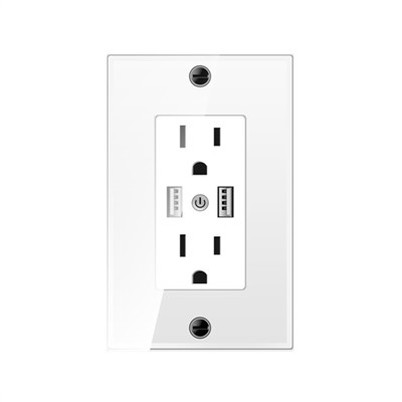
For example, if you have a USA Standard Socket connected to a lamp in your living room, the app will show you if the lamp is currently lit or not. You can also use the app to turn the socket on or off remotely, which is especially useful if you forgot to turn off a device before leaving home.
2. Voice Control
Another popular method for checking the status of a smart socket is through voice control. Many smart sockets are compatible with virtual assistants such as Amazon Alexa, Google Assistant, or Apple Siri.
To use voice control, you first need to link your smart socket to your virtual assistant. This usually involves a few simple steps in the respective app. Once the connection is established, you can ask the virtual assistant questions about the status of your smart socket.
For instance, you can say, "Alexa, is my Charging wall socket turned on?" And Alexa will respond with the current status of the socket. Voice control is not only convenient but also hands - free, which is great when your hands are full or you are in a situation where it's difficult to use your phone.
3. LED Indicators
Some smart sockets are equipped with LED indicators that can give you a quick visual indication of their status. These indicators are usually located on the front or side of the socket.
A common use of LED indicators is to show whether the socket is powered on or off. A green LED might indicate that the socket is on and providing power to the connected device, while a red LED could mean that the socket is off.
In addition, some advanced smart sockets may use different colors or blinking patterns to convey more information. For example, a blinking yellow LED could indicate that there is an issue with the Wi - Fi connection or that the socket needs to be re - paired with your mobile app.
4. Web Interface
In some cases, smart sockets can be accessed through a web interface. This is useful if you don't have your smartphone with you or if you prefer to use a computer to manage your smart home devices.
To access the web interface, you need to know the IP address of your smart socket. This information can usually be found in the device's manual or in the mobile app. Once you have the IP address, you can enter it into a web browser on your computer.
The web interface will then display the status of the smart socket, similar to what you would see in the mobile app. You can also perform various functions such as turning the socket on or off, setting schedules, and viewing power consumption data.
5. Integration with Smart Home Hubs
If you have a smart home hub such as Samsung SmartThings or Hubitat Elevation, you can integrate your smart socket with it. Smart home hubs act as a central control point for all your smart home devices.
Once the smart socket is integrated with the hub, you can use the hub's interface to check the status of the socket. The hub may also allow you to create more complex automation rules. For example, you can set the smart socket to turn on when a motion sensor detects movement in a room or to turn off when a certain time of day is reached.
Why Checking the Status is Important
Checking the status of your smart socket is not just about convenience; it also has several practical benefits.
Energy Efficiency: By knowing the power consumption of your devices through the smart socket, you can identify which appliances are using the most energy and make adjustments accordingly. This can help you save on your electricity bills in the long run.
Device Safety: Monitoring the status of your smart socket can also help ensure the safety of your devices. If you notice that a device is consuming an unusually high amount of power, it could be a sign of a problem, such as a short circuit or a malfunctioning appliance. You can then take appropriate action to prevent any potential hazards.
Remote Management: The ability to check the status of your smart socket remotely gives you greater control over your home or business. You can make sure that all devices are turned off when not in use, even if you are away. This can provide peace of mind and help prevent any unnecessary energy waste.
Conclusion
In conclusion, there are multiple ways to check the status of a smart socket, including using a mobile application, voice control, LED indicators, web interfaces, and smart home hubs. Each method has its own advantages, and you can choose the one that best suits your needs and preferences.
If you are interested in purchasing high - quality smart sockets for your home or business, we are here to help. Our smart sockets are designed with the latest technology to provide reliable performance and easy status checking. Whether you need a USA Standard Socket or a Charging wall socket, we have a wide range of products to meet your requirements. Contact us for more information and to start a procurement discussion.
References
- Smart Home Technology Handbook: A guide to understanding and implementing smart home devices, including smart sockets.
- Manufacturer's manuals for various smart socket models.
- Online resources and forums dedicated to smart home technology.